Firestore, Authentication, Storage, and local Index Advisor share one native macOS workspace.

Native Firebase workspace for macOS
Firestore, Auth, and Storage in one native app.
Firestore GUI for macOS
Query Firestore collections, inspect documents in Table, Tree, or JSON views, manage Firebase Auth users, and browse Storage in one native app. Connect supported Firebase projects and local emulators, with the active project and database always visible.
Index AdvisorLocal index diagnosticsFirestoreQuery Firestore as a table, not a console document listAuthSearchable Firebase Authentication usersStorageBrowse files without leaving the project workspace
Move the same query result through Table, Tree, JSON, and Logs without rerunning the workflow.
Use guided controls for routine work or local JavaScript when the job needs more precision.
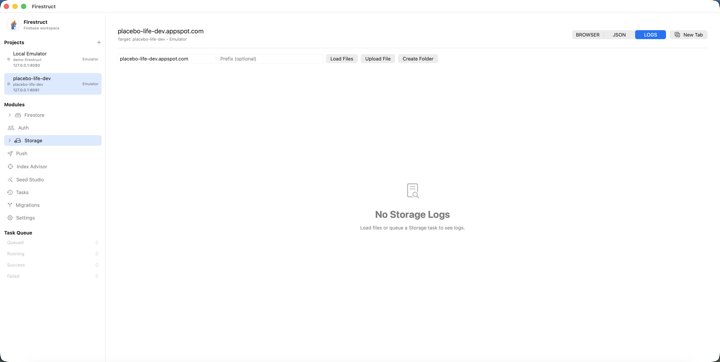
Query Firestore as a table, not a console document list
Simple query mode keeps filters, saved templates, column controls, and structured documents in one operator-focused workspace.
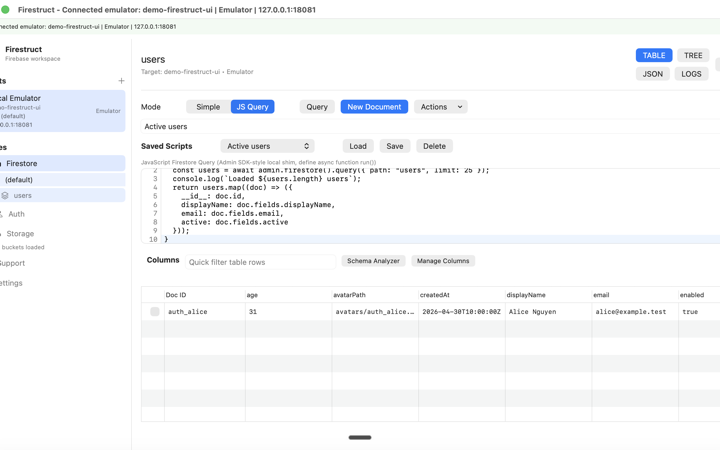
JavaScript queries with native result views
Write and save async Firestore scripts, return structured rows, and inspect the same result as a table, tree, JSON document, or console log.
Current workflows in 1.2
The Firebase work you repeat, finally in one place.
Explore the query builder, document editor, user manager, and emulator workflows.
Index Advisor
Understand your query indexes.
Compare a Simple query with local index definitions without changing Firebase data.
Key workflows
- Send the collection, filters, and ordering straight from Firestore.
- Inspect local coverage, field order, sort directions, and suggested index JSON.
- Available in Free mode; live sync and automatic index deployment are not included.
Firestore
Explore and operate Firestore from a real data workspace.
Build queries, inspect nested documents, tune columns, and keep guarded data operations in the same project and database context.
Key workflows
- Run Simple or JavaScript queries and reuse saved query templates and scripts.
- Switch results between Table, Tree, JSON, and Logs views.
- Use emulator-proven imports, exports, transfers, and edits; live writes remain behind guarded request-shape and confirmation workflows.
Auth
Manage Firebase Auth users without losing application context.
Search and edit users, inspect claims and providers, and jump between an Auth identity and its linked Firestore profile.
Key workflows
- Search, sort, create, edit, disable, delete, import, export, and transfer users.
- Run local JavaScript with an admin.auth()-style API and structured results.
- Route project-wide or tenant-scoped identities to shared or separate Firestore destinations.
Storage
Browse Firebase Storage beside Auth and Firestore.
Emulator workflows are proven; approved live bucket verification is still open.
Key workflows
- Browse emulator buckets with covered folder navigation and file metadata views.
- Use emulator-proven upload, download, delete, URL, and preview actions; production controls stay guarded until live proof lands.
- Hand a Storage URL directly into the Auth profile-photo workflow.
Built for real Firebase workflows
More than three tabs sitting next to each other.
The modules share project context, saved state, output views, and guarded task execution. That makes cross-module work—especially multi-tenant identity support—feel like one workflow.
Multi-tenant Auth
Route every tenant to the right Firestore data.
Connect project-wide Auth or individual tenants to a Firestore project, database, and collection without relying on whichever target happens to be selected.
- Shared collection or separate collection routes
- Same-project, cross-database, or cross-project destinations
- UID field mapping and optional tenant discriminator
Reusable work
Save the query once. Reopen the whole view.
Saved queries, scripts, column layouts, tabs, and session state turn recurring support and data checks into repeatable workspaces.
- Saved Simple queries and JavaScript scripts
- Persistent column visibility and nested-field splits
- Restored tabs, query state, and split-pane context
JavaScript queries
Drop into code without leaving the native app.
Run async local scripts against Firestore or Auth through familiar Admin SDK-style shims, then inspect returned rows and console output in the normal result views.
- admin.firestore() and admin.auth()-style APIs
- Structured Table, Tree, and JSON results
- Captured console output in Logs
Operational safety
Know the target before an operation starts.
Read-only project mode, explicit production confirmation, overwrite previews, and queued progress keep risky Firebase work visible and reviewable.
- Read-only project guardrails
- Explicit environment and database labels
- Queued progress, operation counts, errors, and retry
Next release · Version 1.3
Read-only Migrations Inspector
Version 1.3 build 21 is prepared in App Store Connect. Compare local Fireway files with migration records in a Firebase emulator. Version 1.2 remains the public Mac App Store release.
Build 21 and the review screenshots are prepared in App Store Connect. Version 1.2 remains the public release.
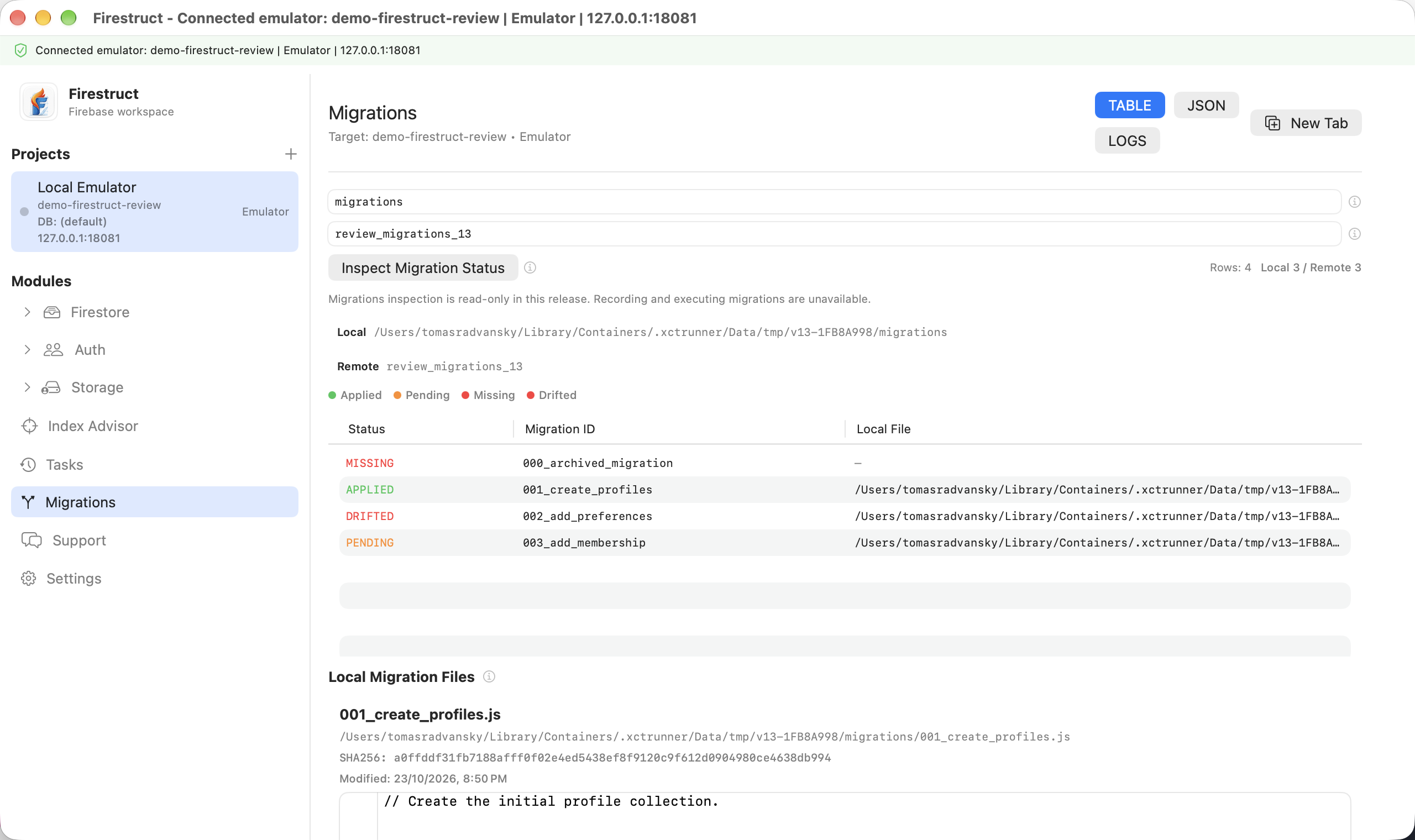
- Browse ordered migration files, source previews, checksums, and modified dates.
- Compare local files with emulator records to inspect applied, pending, missing, and changed migrations.
- Review Table, JSON, and Logs with the selected project and environment visible.
The 1.3 inspector does not execute migration scripts or write migration records. Production record browsing is deferred until its authentication flow is verified. Standalone local-only inspection remains planned. Review has not been submitted and no release date is announced.
Firebase desktop app
For developers who have outgrown console tab switching.
Firestruct combines approachable Firebase GUI controls with a local JavaScript escape hatch. If you are comparing Firefoo alternatives, the dedicated comparison article covers the product angle in more detail.
One connected Firebase workspace
Firestore querying, Auth administration, and Storage browsing live in one native macOS app with the selected target always visible.
If you are comparing Firebase GUI tools, Firestruct keeps the core database, identity, and file workflows together without flattening them into one crowded screen.
Multi-tenant identity routes
Auth tenants can map to shared collections, separate collections, another database, or another linked Firebase project.
The route stores the Auth source and Firestore destination explicitly, so linked-user navigation does not depend on transient UI selection.
Guided controls and real code
Simple query builders cover the everyday path; saved JavaScript scripts handle custom Firestore and Auth work through local Admin SDK-style shims.
Both modes feed the same Table, Tree, JSON, and Logs views, which makes scripted results feel like part of the app instead of a separate tool.
Operational guardrails
Long-running imports, exports, transfers, deletes, and uploads run through task progress and explicit production-write confirmation paths.
Target environment, overwrite behavior, operation counts, and errors remain visible before and during consequential Firebase work.
Next steps
Download Firestruct or explore the workflows.
Download the Firebase GUI for macOS.
Start with free read-only access to supported Firestore, Auth, and Storage workflows. Choose Pro for saved workflows, scripts, and guarded data operations.
Start free, then pick subscription or lifetime access.
Firestruct is on the Mac App Store with a limited free mode, monthly and yearly Pro, and a lifetime plan for people who prefer to buy once.
Compare Firestruct with other Firebase desktop clients.
Review how the connected Firestore, Auth, and Storage workspace approaches saved queries, scripting, multi-tenancy, and guarded operations.
Product updates
Keep up with Firestruct.
Request product updates for the native Firebase GUI and tell us which workflow matters most to your team.