See the current Firestruct workspace.
Explore local Index Advisor in Firestruct 1.2 alongside Firestore Simple and JavaScript queries, Auth user administration and scripting, and the Firebase Storage browser.
Images were refreshed from the 1.3 review build. Version 1.2 remains the public Mac App Store release.
Local index diagnostics
Compare a Simple query with loaded index definitions and review deterministic suggestions. Local analysis makes no Firebase changes and does not verify deployed indexes.
Query Firestore as a table, not a console document list
Simple query mode keeps filters, saved templates, column controls, and structured documents in one operator-focused workspace.
JavaScript queries with native result views
Write and save async Firestore scripts, return structured rows, and inspect the same result as a table, tree, JSON document, or console log.
Searchable Firebase Authentication users
Auth table mode keeps users, providers, claims, profile fields, and linked Firestore context visible while support actions stay close.
Script Firebase Authentication with admin.auth()
Run saved Auth scripts locally, return structured user records, and keep providers, claims, and console output inside the current project context.
Browse files without leaving the project workspace
Emulator-proven Storage browsing, upload/download/delete actions, metadata, previews, and URL workflows stay next to the selected project context while production controls remain guarded.
Read-only Migrations Inspector
Version 1.3 build 21 is prepared in App Store Connect. Compare local Fireway files with migration records in a Firebase emulator. Version 1.2 remains the public Mac App Store release.
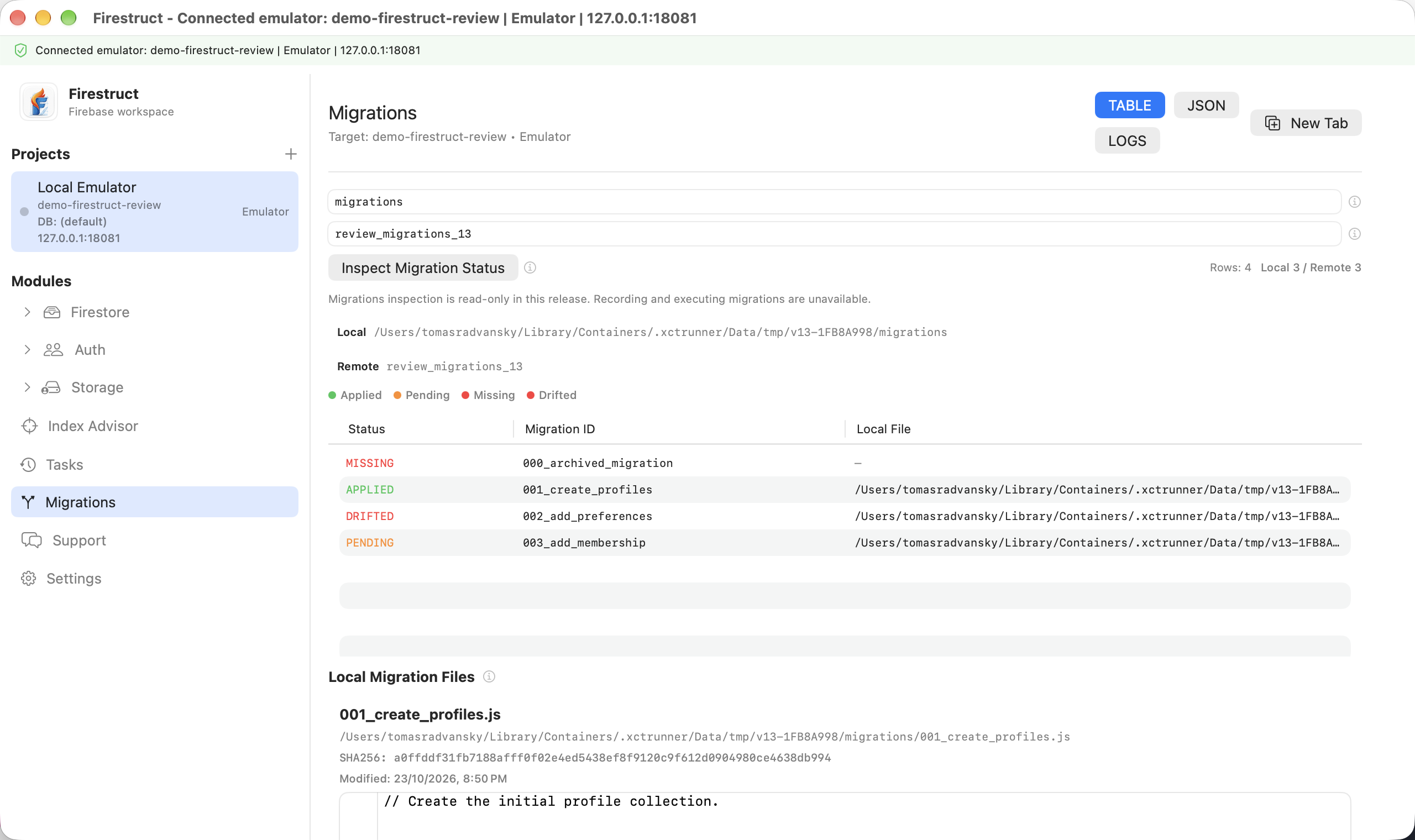
The 1.3 inspector does not execute migration scripts or write migration records. Production record browsing is deferred until its authentication flow is verified. Standalone local-only inspection remains planned. Review has not been submitted and no release date is announced.
Real screens from connected Firebase workflows.
The gallery focuses on the current macOS build rather than concept art. Each screenshot shows an implemented Firestruct surface for connecting projects, selecting emulator or production targets, querying Firestore, inspecting Authentication users, browsing Storage buckets, and reading task or log output when operations need review.
Firestore and Auth each show both query approaches. Simple mode keeps routine filters and saved templates approachable. JavaScript mode exposes local Admin SDK-style APIs, saved scripts, structured results, and console output through the same Table, Tree, JSON, and Logs views.
Auth and Firestore also share tenant-aware user routes: an identity can open its linked document in a shared collection, another database, or another linked Firebase project. Storage completes the workspace with bucket navigation, metadata, previews, and URL actions.